You build with AI
- The problem
- Is your data open to anyone?
- What you get
- Understand your app’s risks and the next fix.
Built with AI? Added AI to your system?
Enter your site address: Hackaiz finds the real flaws, shows you the proof, prepares the fix and offers optional follow-up.
No analysis without proof the site or repository is yours: DNS, HTTPS file or GitHub connection.
ATTACK SURFACE
VERDICT
Web surface checked
Public routes and browser protections were verified.
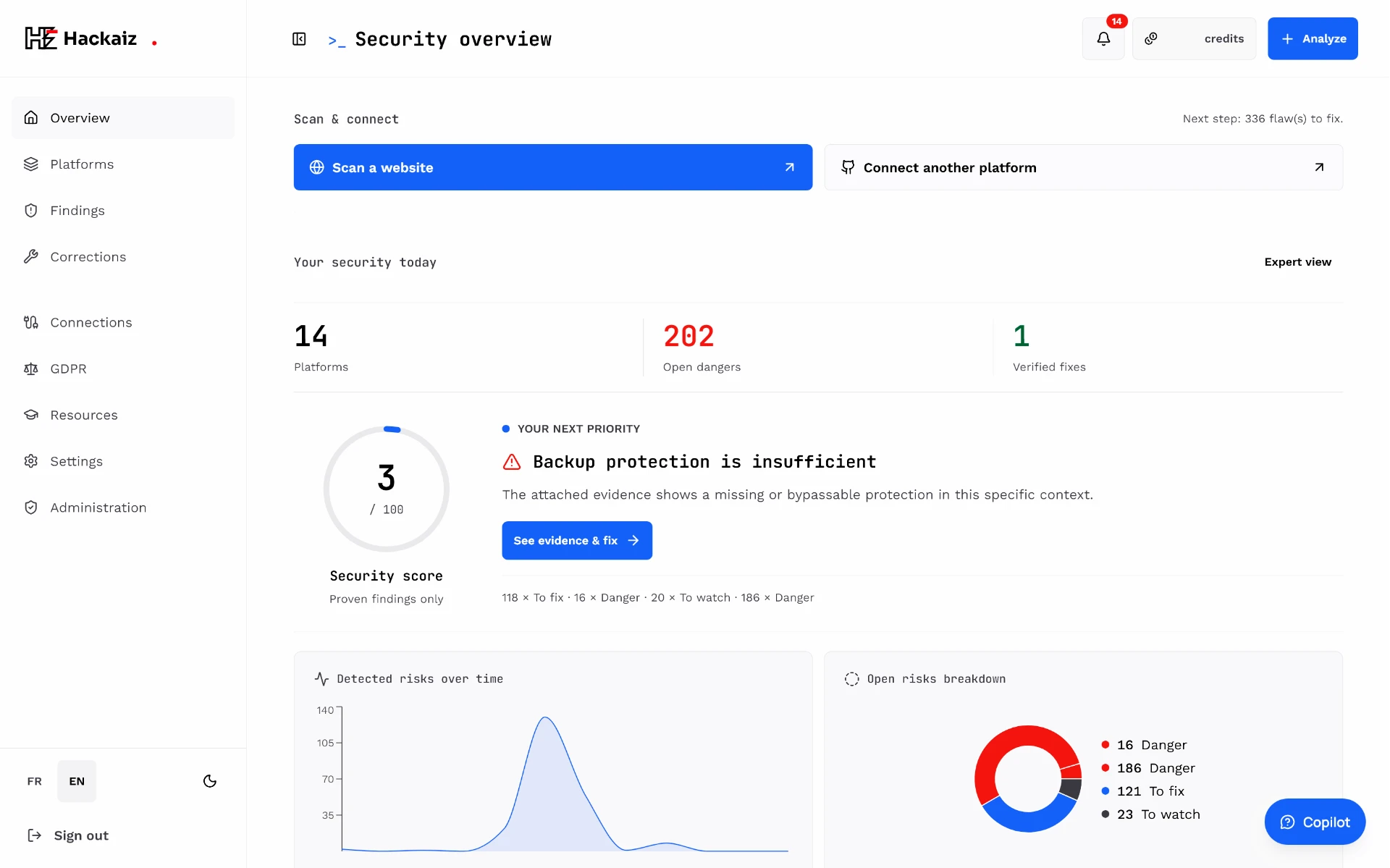
The real product
Score, top priority, evidence and monitoring: everything is gathered in one clear view, from your very first analysis.
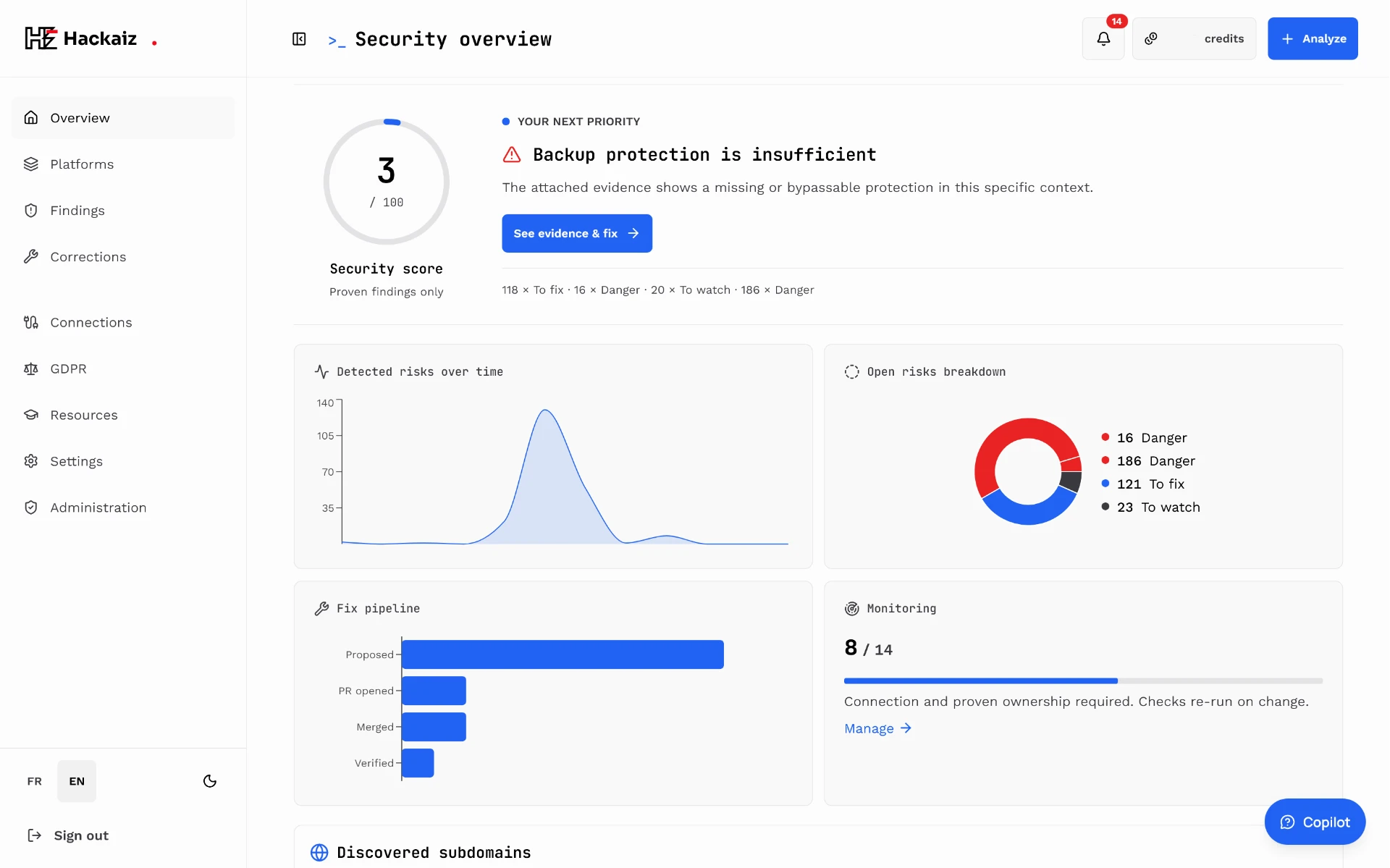
The command center
Analyze a site, connect a platform, follow remediations and watch: everything starts from this screen.
Why Hackaiz
Your application works, but that does not tell you who can read its data, call its APIs or use its AI tools. An exposed key or an overly broad access rule can go unnoticed behind an interface that looks perfect.
Authorize the assets you want examined: a proven website, a selected GitHub repository or a read-only database. Hackaiz looks for risks supported by that access, shows what was observed and explains the next step. You retain control over fixes. If your product evolves, you can enable change follow-up instead of remembering to rerun checks yourself.
Figures recorded on November 20, 2026.
Understand the risk. Review the evidence. Decide on the fix. Follow what changes.
Not a trap
Being wary of a tool that analyses your code is healthy. Here are the safeguards built into Hackaiz, and their limits.
No website is analysed without DNS or HTTPS-file proof for the exact domain. Repositories only come through the GitHub App installation you choose. You cannot target someone else's site.
No deletion, no data changes, no overload. Hackaiz proposes fixes, never merges them and never touches your default branch.
Keys and passwords found are masked automatically before being stored as evidence. You can revoke access and request deletion of your data.
Every action is written to a hash-chained log whose fingerprint is anchored daily through OpenTimestamps (Bitcoin). Later tampering becomes detectable.
These safeguards describe how Hackaiz works; they are not a certification.
Open the trust center →Standards and compliance
Privacy, AI, accessibility, Web3, payments… 8 areas. Every report shows what is proven, what is not, and what to fix. Compliance help, not a certification.
Explore the AcademyPrompts & Claude skills vs Hackaiz
AI review helps you build. Hackaiz adds checks on authorized assets and a report to decide what to fix; it does not guarantee detection of everything.
What is examined
Supplied context and files accessible through its tools
Real-world test
Possible with tools and authorized access
Proof
Verify whether output is explanation only or includes test results
Configuration outside code
Accessible only when tools and permissions allow it
What is examined
The deployed site, the connected repository, database rules and AI endpoints
Real-world test
Authorized read-only requests against the real system after domain proof
Proof
Each reported finding is tied to a captured server response or code location
Configuration outside code
According to connections and executed checks; limitations shown
Asking the AI that wrote your app to secure it is like asking a spell-checker whether your front door locks.
Even with a capable AI agent, authorization, evidence and human decisions remain necessary. A powerful engine does not replace the driver and traffic rules.
See the full comparisonWho, why, how
The figures below come from public studies, not from us.
From authorization to follow-up: steps available according to granted access and selected checks.
Address
You give your site address or connect your repository.
Ownership proof
A DNS record or file proves the system is yours.
Agent analysis
Specialized agents explore, challenge and verify each other.
Evidence-backed finding
Observed evidence and confidence levels are kept.
Fix proposed
A proposal can be prepared for eligible fixes.
Approved by you
Approval allows a PR; your team tests, merges and deploys.
Re-verified
A new check looks for whether the issue remains.
Monitored
Optional follow-up for eligible targets, within credits and authorization.
For you
For your experts
Hackaiz versus manual penetration testing, generic scanners and dependency tools — what each covers and what each does not. Product-specific comparisons link to official sources.
A one-off need: credits without a plan. An evolving product or a team: suitable credits and tools for one month or one year with no automatic renewal. Monitoring remains optional and uses credits.
Essential
$19.00/ month
100 credits/month · optional monitoring within your balance
Launch
$49.00/ month
300 credits/month · optional monitoring within your balance
Enterprise
$149.00/ month
1,000 credits/month · optional monitoring within your balance
Agency
$199.00/ month
1,300 credits/month · optional monitoring within your balance
Business
$349.00/ month
2,300 credits/month · optional monitoring within your balance
Hackaiz is developed and published by HACKTUALIZ Inc., an American technology company incorporated in the State of Delaware. The team includes N'CHO YAO, senior cybersecurity expert and AI solutions architect, and Jaheim Kouaho, who drives technology innovation and AI systems engineering.
Combine your site, repositories and databases.
Scout
Route /api/users answers without a session.
Sceptic
Maybe public data. Prove it.
Safe tester
Request replayed: 14 private accounts received.
Verdict
Flaw confirmed, evidence kept.
An analysis is a snapshot. Optional follow-up on eligible targets detects changes and reruns configured checks. Watch checks and analyses use credits; you retain the decision to fix.
Sign up and enjoy free credits. Card payment.
Analyze my site


